We provide skilled DStv installers in Milnerton. In fact, our reliable DStv installers are always on standby to help you. If you are looking for a DSTV Installer in Milnerton, your DStv set up will be done quickly so that you can resume your TV watching. You can either book your appointment by dialing 071 3046955 or leaving a message on our contact form. We will send you a skilled DStv installer who will do a good job.
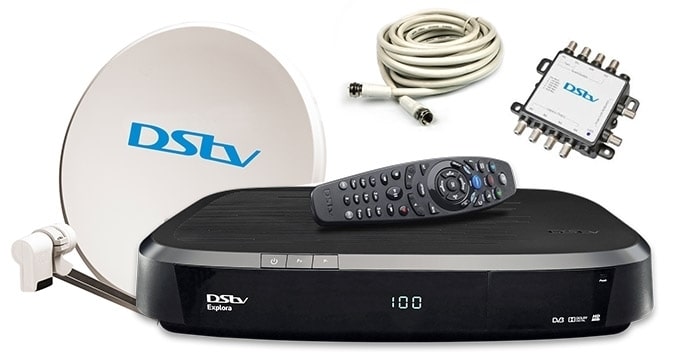
Service We Provide in Milnerton
- Troubleshooting & Repairs Services
- DStv Setup for everyone in Milnerton
- DStv Extra View set up
- Surround Sound
- DStv Relocations
- Dish Alignment
- LNB Replacements
- TV Mounting/ Plasma TV Wall Mounts/ Wall Mounted/ Wall Brackets.
DSTV Installation Milnerton

Our DStv installers are good at completing durable satellite TV connections in Milnerton. To add to that, they will leave your site clean. If you need a reliable DSTV Installer in Milnerton, contact us.
If you have any questions regarding your DStv setup or the type of decoder you need then contact us. In fact, our DStv technicians in Milnerton are always available to provide professional help.
Therefore, hire us today and experience a crystal clear HD picture. Call us at 071 304 6955 or leave us a message to get access to the best DSTV Installer in Milnerton.
DSTV Repairs Milnerton

As approved resellers, we stock a lot of DStv installation accessories. Moreover, we sell these accessories at an affordable price for any DSTV Installer in Milnerton.
Our range of stock includes LNBs, Satellite Dish kits, TV wall brackets, all types of DStv decoders, etc. As a matter of fact, we sell our stock at a reasonable price that does not empty your pockets.
To add to that, our stock is durable. Our technicians know the recommended way of installing all the DStv accessories according to the industry’s best practices. So, you can count on us for the best installations in town by a certified DSTV Installer Milnerton service provider.
Cheap DSTV Explora installers in Milnerton

The DStv Explora is Multichoice’s latest decoder which provides high-quality HD viewing for the user. So, if your DSTV setup is done the wrong way, services such as DSTV catchup & BoxOffice will not work.
If you want to have the best picture quality for your DStv installation then hire an approved DSTV technician. At Sat Digital DSTV installers, we have qualified DSTV installers in Parklands who know how to get the best signal for your Explora.
As a result, you will get to enjoy the best picture quality possible. All you have to do is to contact us on 071 304 6955 for the best DSTV Installer in Milnerton.

Q&A
Tel: 011 289 2222
Our call centre is available seven days a week, including public holidays, from 07:00 – 23:00.
If you don’t know your customer number, you can get it using WhatsApp (060 060 3788). Type in “customer number” to get the info. You can also find your DStv customer number using our MyDStv app. Select “Manage” – your DStv customer is listed at the top of the screen.
E30 – This error code appears when checking subscription status. If the message still appears after two minutes, you can contact the MultiChoice Call Centre for assistance.
E143 – Is typically related to communication issues between your primary and secondary decoders in an Xtraview setup. Here are some steps you can take to resolve this error: Check Connections: Ensure that all cables between the primary and secondary decoders are securely connected.
Power Cycle: Turn off both decoders at the power source, wait a few minutes, and then turn them back on. Signal Levels: Verify that the heartbeat signal from the primary decoder is reaching the secondary decoder. This may require technical assistance to ensure the signal is strong enough.
E32 – This error code appears when the smartcard is not enabled for a channel. It may also mean that your account has been suspended.
E48-32 – This error code appears when there is no signal, which may be due to bad weather or a faulty connection. To fix this, you can try these steps: Check your DStv connection cables, Reboot your decoder, Inspect your DStv satellite dish, Check your LNB, Call the approved DStv installer.
E16 – This error code can appear when: Customers have not paid for their subscriptions Subscription cost is less than what the customer’s subscription would cost Trying to view a channel that is not part of their subscription The customer’s decoder software is outdated.
The Accredited Installer is a service provider to MultiChoice that offers installation services to MultiChoice subscribers. Please note: Gauteng has been identified as a saturated region and MultiChoice Field Services will no longer be granting new accreditations for this area.
A typical DStv installation includes setting up the dish, installing the LNB, routing and connecting the cable, and setting up the decoder. For a detailed breakdown, you can refer to the pricing list. For example, a 10m cable is included in the price.
The time it takes to install DStv can vary based on the complexity of the installation, but it typically takes between 1 to 3 hours.
Fix a DStv no signal error by following the steps below:
Step 1: Check your DStv connection cables. This is one of the easiest checks you can do on your own. …
Step 2: Reboot your decoder. …
Step 3: Inspect your DStv satellite dish. …
Step 4: Check your LNB. …
Step 5: Call the approved DStv installer.
The Access Fee gives you an additional viewing environment without having to pay an extra subscription, and so saves you money. This additional environment can be through another decoder connected in XtraView or through the recording capacity on your decoder.
With XtraView, you can link either two or three decoders together under ONE subscription (and only pay a monthly Access Fee for the other decoders).
When linking two decoders, you will pay your normal monthly subscription plus ONE Access Fee. If one of the decoders is a PVR, you are already paying an Access Fee, so don’t need to pay any more – this means that monthly viewing on your second decoder is FREE!
When linking three decoders, you will pay your normal monthly subscription plus TWO Access Fees.