DStv’s Extra View feature allows you to connect multiple TVs to a single DStv subscription. This is a great way to enjoy DStv content in different rooms without needing separate subscriptions. To access Extra View and streaming features, you need an active subscription and a valid DStv account. DStv offers a range of packages, and the number of streams or devices you can use may depend on your selected package and your region. DStv packages allow for one or two concurrent streams on Smart TVs, laptops, or smartphones without extra hardware. For more information on packages, account management, and regional availability, visit the official DStv website.
In this guide, we’ll break down the DStv Extra View setup, the requirements, and the number of TVs you can connect.
If you need professional help with installation or setup, our Sat Digital DStv installers are here to assist! We provide services across various locations, and our team ensures your DStv multiple TV connection is optimized for the best signal reception based on your specific location.
1. What is DStv Extra View?
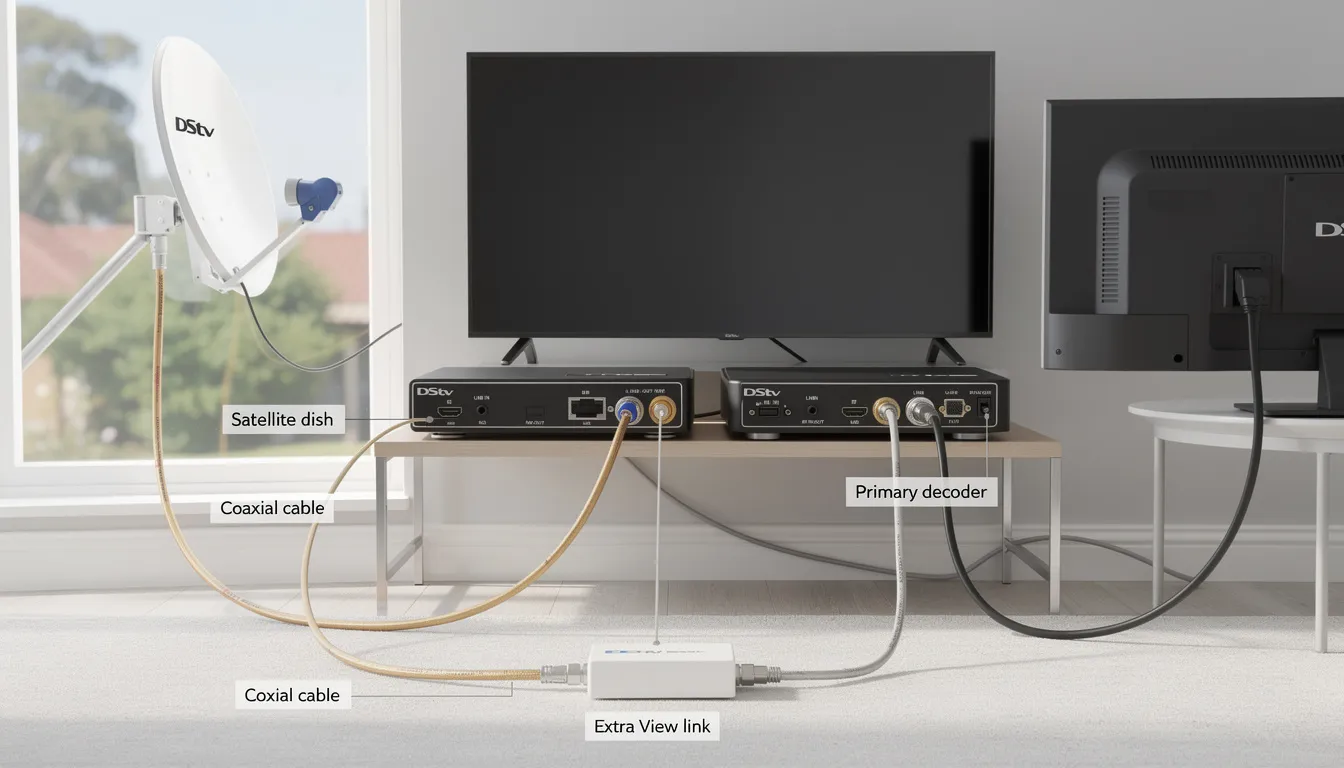
DStv Extra View allows you to link multiple decoders to one subscription, enabling you to watch DStv on multiple TVs or stream on different devices at the same time. This feature is perfect for households with more than one TV, as it allows each TV to access different channels based on the decoder’s package.
DStv XtraView allows up to three independent decoders to operate under one subscription, and all connected decoders share the same package, including premium channels.
However, there are certain requirements and limitations when connecting multiple TVs using Extra View.
2. How Many TVs Can You Connect to DStv Extra View?
You can connect up to 3 DStv decoders using DStv Extra View, with each decoder linked through a proper connection to ensure reliable signal quality and seamless communication between units. This setup allows you to watch different channels on each TV, but all decoders must share the same subscription level. Each additional decoder in the Extra View connection requires a small monthly access fee, currently R85 per decoder. When planning your DStv multiple TV connection, consider both the installation cost and ongoing monthly fees. Here’s how it works:
2.1 Connecting 2 TVs with Extra View
-
One decoder is the primary decoder, and the other is the secondary decoder
-
You’ll need an Extra View link cable to connect the two decoders.
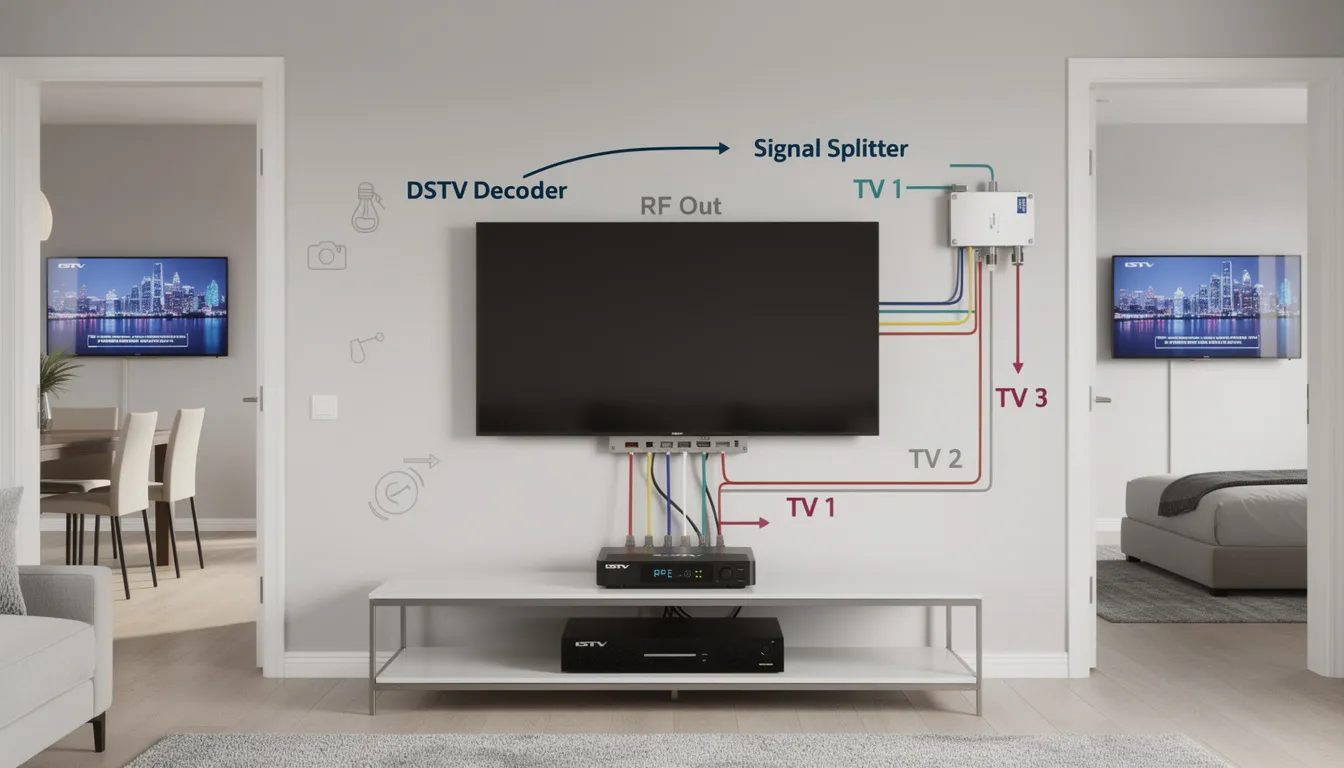
The easiest way to connect a second TV to your DStv decoder is by using an HDMI splitter, which allows both TVs to display the same channel in high definition. If your second TV does not support HDMI, you can use RCA cables, but the picture quality will be lower. A wireless AV sender is another option for connecting a second TV in another room without running cables through the house. Connecting two TVs to one decoder with a splitter is cost-effective if you only want to watch the same channel on both screens. For added convenience, you can control your DStv from the second TV by installing a DStv TV Link (Magic Eye), which sends remote control signals to the decoder from another room.
2.2 Connecting 3 TVs with Extra View
In some cases, you can connect 3 TVs by using 3 decoders.
-
The primary decoder is linked to two TVs (or two secondary decoders) via Extra View. Decoders in DStv XtraView depend on a “heartbeat” signal from the primary decoder, which is transmitted through a heartbeat cable to synchronize and enable independent operation across multiple TVs.
-
The DStv Extra View system requires a Smart LNB for proper communication between the primary and secondary decoders.
-
To connect the third TV, you’ll need to use an additional decoder with the necessary Extra View link cable.
Professional installation is highly recommended to link decoders correctly, as this setup can incur upfront costs and ensures your satellite dish alignment and signal distribution are properly configured.
3. DStv Extra View Setup Requirements
Before connecting multiple TVs, ensure you have:
-
Extra View decoders: Your decoders must be compatible with Extra View, such as the DStv HD Decoder or DStv Explora
-
Extra View link cable: This is used to link the decoders together.
-
A properly aligned satellite dish: Make sure the dish is aligned correctly for optimum signal reception.
-
An extra cable to connect to each TV.
For Extra View and multi-TV setups, it is highly recommended to use professional installation (install) services. Accredited DStv installers provide expert service, ensuring all technical standards are met and the system is tailored to your property’s specific needs. Typical costs for professional DStv Extra View installation range from R1200 to R1600 for multi-decoder setups. Basic installation services for standard single-view setups start from R650 to R800, while DStv Explora installations cost between R900 and R1200 due to advanced technology requirements.
4. Recommended Decoders for DStv Extra View
Choosing the right decoder is essential for a smooth DStv Extra View setup and the best possible viewing experience across multiple rooms. The DStv Explora stands out as a top choice, offering advanced features like PVR (Personal Video Recorder) functionality, which lets you record, pause, and rewind live TV. This decoder is designed to work seamlessly with Extra View installations and is fully compatible with Smart LNB technology and modern satellite dish setups.
Other reliable options include the SD PVR and HD PVR decoders, which can also be linked together to enable Extra View and multi-room viewing. When selecting your decoders, make sure they are specifically designed for Extra View and can integrate smoothly with your existing dish and Smart LNB. A professional DStv installer can help you assess your current setup, recommend the most suitable decoder models, and handle the installation to ensure everything is configured correctly for uninterrupted viewing.
Whether you’re upgrading your home entertainment system or setting up DStv for a business, choosing the right decoder and expert installation will enable you to enjoy all the benefits of Extra View without hassle.
5. Signal Quality and Performance Considerations
When connecting multiple TVs to one decoder with DStv Extra View, maintaining excellent signal quality is key to enjoying clear picture and uninterrupted viewing. Several factors can impact your setup’s performance, so it’s important to pay attention to the following:
-
Use high-quality cables: Opt for premium RCA or HDMI cables to connect your decoders and TVs. Good cables help prevent signal loss and ensure the best possible picture quality across all connected devices.
-
Optimize your satellite dish: Make sure your satellite dish is properly aligned and securely mounted. Even a slight misalignment can affect signal strength, especially when distributing the signal to multiple TVs.
-
Configure your Smart LNB: The Smart LNB is crucial for communication between decoders in an Extra View setup. Proper configuration ensures that each decoder receives the correct signal and that the system operates smoothly.
-
Reduce interference: Keep your cables organized and away from other electronic devices that could cause interference. This helps maintain a stable signal and prevents disruptions while watching DStv.
If you’re unsure about any part of the setup, or if you notice issues with signal quality, it’s best to consult a professional DStv installer. They can fine-tune your dish, configure your Smart LNB, and check all cables and connections to guarantee optimal performance for your Extra View installation. With the right setup, you’ll enjoy seamless viewing on multiple TVs from a single subscription.
4. Benefits of DStv Extra View
-
Save on Subscription Costs: Instead of paying for multiple subscriptions, Extra View allows you to share the same DStv package across multiple TVs.
-
Flexible Viewing: Enjoy your favorite shows in multiple rooms without the hassle of switching channels or sharing one TV.
Extra View also allows you to watch DStv on multiple devices. Customers can add up to two extra mobile-only streams for a small monthly fee.
5. Troubleshooting DStv Extra View
If you’re having issues with your Extra View setup:
-
Check that your dish alignment is correct for optimal signal reception.
Common DStv error messages include E48-32, which indicates weak signal reception, and E143, which may occur if the primary decoder is turned off or has a connection issue, causing secondary TVs to lose service. Heartbeat issues can also disrupt service to secondary TVs when the secondary decoder does not receive signals from the primary decoder.
If you experience signal quality issues or error messages, adjust your satellite dish alignment and consider signal amplification, especially for long cable runs or when using multiple splitters. Testing all connection points is essential to ensure proper signal distribution across decoders.
Sometimes, waiting for decoder communication to sync may resolve certain issues, but professional diagnosis is often necessary for complex DStv connection problems that standard resets cannot fix.
If you need professional assistance, our Sat Digital DStv installers can diagnose and resolve any problems quickly.
6. Get Help with DStv Extra View Installation
Setting up DStv Extra View for multiple TVs can be tricky. Sat Digital DStv installers provide expert service across a wide range of locations and regions, ensuring reliable installation and support wherever you are. Our installation services include support for both traditional decoder connections and streaming setup, so you can stream DStv content on multiple devices or enjoy it via your decoder. We offer comprehensive coverage for homes and businesses, with ongoing support and system optimization after installation. Our technicians can resolve DStv connection issues and optimize your system for both streaming and traditional viewing. If you need help, our expert Sat Digital DStv installers offer: Professional Extra View installation Satellite dish alignment Decoder and cable troubleshooting
For a seamless DStv Extra View experience, contact us today for expert installation and support.
is Africa’s leading satellite TV provider, offering a wide range of entertainment, sports, and news channels. Enjoy premium viewing with HD and streaming options. For expert setup, check out our DStv
Extra View Features: What You Get Beyond Multiple TVs
DStv Extra View is more than just a way to connect multiple TVs to one subscription—it’s a feature-rich solution designed to elevate your home entertainment experience. With Extra View, each TV in your home can tune into different channels at the same time, so everyone can watch their favorite shows without compromise. This flexibility is perfect for families with diverse viewing preferences or for businesses that want to offer a variety of channels in different rooms.
The integration of a Smart LNB ensures that signal distribution remains strong and consistent, delivering excellent picture quality to every connected TV. Whether you’re watching live sports in the lounge or catching up on series in the bedroom, you’ll enjoy crisp visuals and reliable performance. Extra View also unlocks PVR (Personal Video Recorder) capabilities on compatible decoders, allowing you to record, pause, and rewind live TV on each device. This means you never have to miss a moment, even if your schedule is busy.
With DStv Extra View, you get the freedom to watch what you want, where you want, and when you want—all from a single subscription. It’s the ultimate way to maximize your viewing options and enjoy seamless entertainment across multiple TVs.
Cost and Pricing: What to Expect with DStv Extra View
When planning your DStv Extra View installation, it’s important to understand the costs involved so you can budget effectively. The price for a standard Extra View setup with two decoders typically ranges from R1200 to R1600, which covers the equipment, professional installation, and activation. This upfront investment ensures that your system is installed correctly and optimized for the best signal quality and viewing experience.
In addition to the installation cost, there is a monthly access fee of R95 for each additional decoder connected via Extra View. This small fee allows you to watch different channels on multiple TVs without paying for separate subscriptions, making it a cost-effective solution for families and businesses alike.
To get the most accurate pricing for your specific needs, it’s best to consult a qualified DStv installer. They will assess your property, recommend the ideal setup, and provide a detailed quote that includes all necessary equipment and labor. With professional guidance, you can enjoy the benefits of Extra View while keeping your costs transparent and manageable.
Choosing the Right Installer for DStv Extra View
Selecting the right installer is a crucial step in ensuring your DStv Extra View setup delivers the best possible performance. A Multichoice-accredited DStv installer brings the expertise needed to handle complex installations, from configuring the Smart LNB to optimizing signal quality across all connected TVs. They understand the technical requirements of Extra View, including decoder setup, heartbeat cable connections, and signal distribution.
A professional installer will evaluate your property’s layout, recommend the most effective connection strategy, and provide a clear diagram of how your decoders and TVs will be linked. They’ll also handle all the necessary configuration, ensuring your decoders communicate seamlessly and your subscription is activated correctly. This attention to detail guarantees a hassle-free experience and minimizes the risk of signal issues or connection errors.
By choosing an experienced DStv installer, you benefit from expert service, free advice on system upgrades, and ongoing support for any future adjustments or troubleshooting. This ensures your Extra View setup remains reliable and delivers top-quality viewing for years to come.
Conclusion and Final Thoughts
DStv Extra View is the ideal solution for anyone looking to enjoy different channels on multiple TVs while maintaining a single subscription. With its advanced features, robust signal distribution, and cost-effective pricing, Extra View transforms your home or business entertainment setup. By partnering with a professional DStv installer, you ensure your system is configured for optimal performance, giving you peace of mind and uninterrupted viewing.
Always prioritize security and proper verification when managing your DStv account and equipment. This helps protect your subscription and ensures only authorized devices can access your channels. With the right setup and support, you can watch your favorite shows, sports, and movies on any TV in your home—without the hassle of multiple subscriptions or poor signal quality.
For expert advice, installation, and ongoing support, trust Sat Digital to deliver a seamless DStv Extra View experience tailored to your needs. Enjoy the freedom, flexibility, and security that come with a professionally installed Extra View system, and make the most of your DStv subscription today.