What Causes “No Signal” on DStv?
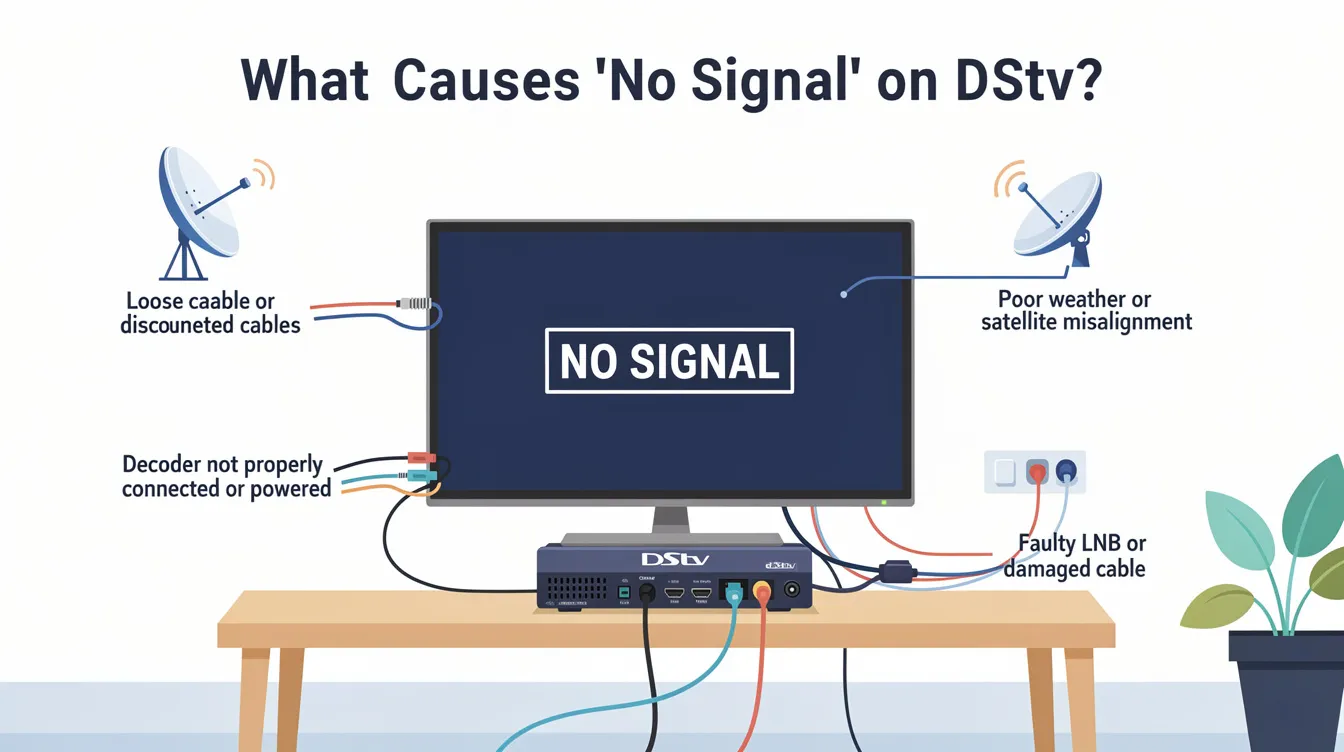
If your DStv shows “No Signal,” it’s usually due to dish misalignment, bad weather, loose cable connections, decoder issues, or signal interference. Error messages like E48-32 often appear on your TV screen, indicating a signal problem. To fix it, start by checking all connections, ensuring the dish hasn’t moved, and restarting your decoder. You can also try rebooting your decoder using your remote control—press 12345 and ‘OK’ on the remote to resolve some signal issues. Managing your DStv account can also help with troubleshooting and exploring support options.
Finding the right solution depends on identifying the specific cause of your DStv no signal issue—whether it’s a simple cable fix, dish realignment, or professional repair.
Still stuck? Sat Digital offers fast, affordable DStv signal repairs across the Western Cape. Call 071 304 6955 or email info@satdigital.co.za for expert help.
Signal Strength and Quality
Maintaining strong DStv signal strength and quality is essential for uninterrupted viewing and the best possible picture and sound from your DStv decoder. A properly aligned satellite dish, securely connected cables, and a well-functioning Low Noise Block (LNB) are all critical components in ensuring your DStv system delivers a strong signal without interruptions or error messages.
A professional DStv installer can make a significant difference when it comes to satellite dish installation. They ensure your dish is positioned for maximum signal strength and that the LNB skew angle is set correctly—both of which are vital for receiving a clear, stable signal from the satellite. During installation or maintenance, they’ll also check all cable connections, making sure everything is securely connected and free from damage that could cause signal loss or a faulty connection.
Adverse weather conditions, such as heavy rain or strong winds, can temporarily disrupt your DStv signal. If you notice a signal problem after bad weather, it’s important to inspect your satellite dish and LNB for any signs of misalignment or damage. Sometimes, certain channels may be more sensitive to weak signals and may display an error message or experience interruptions if the signal strength drops. In these cases, a professional DStv installer can adjust your dish or LNB to restore a strong signal and resolve the issue.
Regular maintenance is key to preventing signal issues. Checking your signal cable for wear, ensuring all f connectors are tight, and replacing a faulty LNB when needed can help avoid unexpected signal loss. If you continue to experience signal problems or if the issue persists despite your efforts, seeking further assistance from an accredited installer is the best way to ensure your DStv system is properly aligned and functioning at its best.
In summary, keeping your DStv dish properly aligned, cables securely connected, and components in good condition is the best way to maintain strong signal strength and quality. For ongoing issues or professional advice, don’t hesitate to contact a trusted DStv installer like Sat Digital for expert service and reliable solutions.
Common Reasons Why DStv Shows “No Signal”
DStv “No Signal” problems are frustrating, especially during your favorite shows. Let’s break down the most common reasons for the issue. If you notice the same issue across multiple channels or decoders, it may indicate a broader signal problem.
The next steps will provide solutions to these common problems.
1. Satellite Dish Misalignment
Strong winds or physical impact can shift your dish, disrupting the signal path and affecting the clear line of sight between the dish and the satellite. Even a few degrees can cause total signal loss.
To prevent these issues, make sure your dish is properly installed and aligned by a professional, as incorrect installation can lead to ongoing signal problems.
2. Bad Weather Conditions
Heavy rain or storms can physically block the satellite signal, causing a no signal error—this is known as rain fade, where rain acts as a barrier and disrupts the DStv signal (blocking), leading to temporary outages. This issue usually resolves once the weather clears.
3. Loose or Damaged Cables
Check that the LNB cable is tightly connected to the decoder and isn’t frayed or bent, as loose or damaged cables can interrupt the signal between the dish and decoder. Water damage or corrosion can also impact signal quality.
Inspect the signal cable from the DStv dish to the decoder for any cuts or breaks. Ensure that the connectors on both the DStv dish and decoder are fitted properly and securely.
4. Faulty LNB (Low-Noise Block Converter)
The LNB on your satellite dish could be failing. A malfunctioning LNB can stop the signal from reaching your decoder entirely.
5. Decoder Software Glitch
Occasionally, your DStv decoder may just need a reset or software update. Outdated firmware can affect how the decoder processes the signal.
Signal Error Diagnosis
Diagnosing signal errors on your DStv system is the first step toward restoring your favorite channels and ensuring a smooth viewing experience. When you encounter a signal error, such as the common E48-32 message on your DStv decoder, it’s important to identify the root cause quickly. Start by checking your decoder for any error messages, which can point to issues like dish misalignment, a faulty LNB, or loose connections in your satellite dish installation.
A professional DStv installer brings specialized expertise and equipment to the diagnosis process. Using a signal strength meter, they can accurately measure the signal quality your decoder is receiving and pinpoint any weak spots or interruptions. This allows them to adjust your satellite dish for optimal alignment, replace a faulty LNB, or secure any loose connections that might be causing signal loss. Regular signal error diagnosis not only helps resolve current issues but also prevents future signal problems, ensuring you always have strong signal access to your favorite channels. For the best results, trust a professional to assess and adjust your DStv installation, keeping your system running at peak quality.
Signal Error Messages
Signal error messages on your DStv system, such as the E48-32 error, can be both confusing and disruptive. These messages are your decoder’s way of alerting you to a problem with signal reception, which could be due to adverse weather conditions, dish misalignment, or faulty connections. For instance, the E48-32 error often appears during heavy rain or storms—a phenomenon known as rain fade—when bad weather temporarily blocks the satellite signal.
Understanding what these error messages mean can help you troubleshoot more effectively. While some issues, like temporary weather disruptions, resolve on their own, persistent error messages may indicate a deeper problem with your dish, LNB, or cabling. In such cases, a professional DStv installer can quickly identify and resolve the underlying cause, ensuring your system is properly installed and configured for a strong, stable signal. Don’t let error messages interrupt your viewing—get professional help to restore your DStv service and enjoy uninterrupted access to your channels.
Signal Issues and Interference
Signal issues and interference can significantly impact your DStv experience, leading to weak signal strength, pixelation, or even complete signal loss. Common culprits include dish misalignment, a faulty LNB, loose connections, and adverse weather conditions. Sometimes, interference from nearby electronic devices or physical obstructions can also degrade your signal quality, causing channels to freeze or disappear.
To resolve these signal issues, it’s essential to identify the exact cause. This might involve adjusting the alignment of your satellite dish, replacing a faulty LNB, or tightening loose cable connections. In cases where interference is suspected, removing or relocating potential sources can help restore signal quality. A professional DStv installer has the expertise and tools to diagnose and fix these problems efficiently, ensuring your DStv system delivers a strong, reliable signal and uninterrupted access to all your favorite channels. For persistent or complex signal issues, professional assistance is the best way to restore high-quality viewing.
Step-by-Step: How to Fix DStv “No Signal” Error
-
Unplug your decoder and check the satellite cable at the back.
-
Ensure the LNB cable is securely attached with no visible damage.
-
Visually inspect the dish from the ground. Has it shifted or been hit?
-
Clear any overgrowth in front of your DStv dish to improve reception.
-
If it looks misaligned, don’t attempt to adjust it yourself—call Sat Digital for proper realignment. Professional DStv installers can help with dish alignment to ensure a strong signal, and can quickly diagnose and fix signal problems.
-
Power off the decoder at the wall plug
-
Wait 30 seconds, then turn it back on
-
Wait for the signal to reconnect
-
Go to Menu > Settings > Satellite Settings > Signal Strength
-
If the signal bars are low or missing, there’s likely a dish, LNB, or cabling issue.
If the problem persists after these steps, seeking professional assistance is recommended. Sat Digital’s expert team can resolve persistent DStv signal issues efficiently.
DStv Viewing Experience
A seamless DStv viewing experience depends on a strong and stable signal from your satellite dish. Regular maintenance and prompt attention to signal issues are key to enjoying uninterrupted access to your favorite channels and programs. By ensuring your satellite dish is properly aligned, your LNB is securely connected, and all cables are in good condition, you can prevent most common signal problems.
A professional DStv installer can help you optimize your system for the best possible signal strength and quality. They’ll make sure every component is securely connected and properly aligned, and provide further assistance if any signal issues arise. With expert support, you can quickly resolve any problems and maintain a high-quality viewing experience. Don’t let signal interruptions spoil your entertainment—keep your DStv system in top shape with regular checks and professional help when needed.
When to Call a DStv Installer
If the above steps don’t work, the problem might be too complex to solve on your own. That’s where Sat Digital comes in.
Why Choose Sat Digital?
-
Same-day signal repairs in Cape Town, George, Durbanville & more
-
Professional dish realignment & LNB replacements
-
Affordable decoder servicing & upgrades
Call 071 304 6955request a callback via email at info@satdigital.co.za
Locations We Cover
We offer expert DStv installation services in Cape Town and the Western Cape. Whether you’re moving in or upgrading, our team ensures fast, reliable setup with perfect signal — every time.
We also assist with DStv Explora setup, extra view installations, and OVHD setups
Helpful Tips to Prevent “No Signal” Errors
-
Secure your dish firmly to withstand wind
-
Use high-quality, weatherproof cables
-
Avoid tampering with dish alignment yourself
-
Schedule annual maintenance with a DStv professional
Visit dstv.com or multichoice.com for more technical guides or decoder settings.
Final Checklist
Before reaching out to a professional DStv installer, it’s worth running through a quick checklist to rule out any simple issues that might be causing your signal problems:
-
Check your DStv decoder for any error messages, such as the E48-32 error.
-
Ensure your satellite dish is properly aligned and securely connected.
-
Inspect the LNB for any signs of damage or wear.
-
Verify that all cable connections are tight and not loose.
-
Use a signal strength meter to check the signal quality reaching your decoder.
-
Restart your DStv decoder and see if the issue persists.
If you’ve gone through these steps and the problem still isn’t resolved, it’s time to contact a professional DStv installer for further assistance. By following this checklist, you can quickly identify and resolve minor signal issues, ensuring your DStv system remains reliable and provides uninterrupted access to all your favorite channels and programs. For persistent or complex problems, professional support will help restore your signal quality and viewing enjoyment.
FAQs – DStv Signal Problems (Optimized for SEO)
Why is my DStv decoder showing “No Signal”?
This usually means your decoder isn’t receiving a signal from the satellite due to dish issues, cable faults, or software errors.
Can bad weather cause signal loss?
Yes. Heavy rain or wind can cause short-term signal loss. However, if it continues after the weather clears, it might be a hardware issue.
Should I realign the dish myself?
No. It’s best to call a certified installer like Sat Digital to avoid misalignment or further damage.
Can I get my signal back without a technician?
Sometimes, yes—check cables and restart your decoder. If it doesn’t work, professional help is recommended.
How much does a DStv signal repair cost?
Pricing depends on the issue. Contact Sat Digital for a quick and free quote.
Get Fast Signal Repairs – Contact Sat Digital
Don’t miss another show. Whether you need a dish realigned, an LNB replaced, or just quick signal troubleshooting, Sat Digital is ready to help.
Call 071 304 6955 or email info@satdigital.co.za for expert support today.
We’re your trusted DStv specialists in the Western Cape.
Related Articles
If you’re experiencing issues with DStv installation or need a new setup, don’t hesitate to call Sat Digital at 071 304 6955. Our team is ready to provide fast and professional installation services, ensuring a hassle-free experience. Whether you’re upgrading or installing for the first time, we guarantee high-quality service every step of the way.